Email Finder Tools Reviews
We began by identifying widely used email finder tools and evaluating them across five key categories: contact and company data availability; data accuracy and quality; lead generation and prospecting tools; integrations and workflow automation; and analytics, performance, and platform reliability. We also considered ease of use, pricing transparency, and scalability for different business sizes.

Apollo.io – Best All-in-One Sales Platform
Apollo.io is a comprehensive sales intelligence and engagement tool that brings together email finder technology, CRM features, and outreach tools into one integrated package. It’s ideal for sales teams seeking data-gathering and execution tools in one place, helping them avoid switching between apps in the sales stack. The application has an extensive contact list and sequencing functions to help the user execute the entire outbound sales process.
One unique aspect of Apollo.io is its integrated approach to prospecting and engagement. The user can create highly customized prospect lists using complex filtering techniques and then initiate email sequences or integrate the prospects into a CRM system.
- Large integrated database and outreach tools
- Strong filtering and segmentation options
- All-in-one sales workflow platform
- Steeper learning curve for beginners
- Data accuracy can vary depending on the industry or region

Apollo.io dashboard.
Get a demo Visit Apollo.io’s website
Apollo.io features
- Contact & Company Data Availability: Extensive global database with detailed firmographic and technographic data
- Data Accuracy & Quality: Generally strong, with enrichment and ongoing updates, though some inconsistencies may appear in niche industries
- Lead Generation & Prospecting Tools: Advanced search filters, intent data, list building, and lead scoring capabilities
- Integrations & Workflow Automation: Native CRM integrations (Salesforce, HubSpot, Sales Navigator, etc.) plus automated email sequencing and workflows
- Analytics, Performance, & Platform Reliability: Engagement tracking, pipeline analytics, and performance dashboards
How Apollo.io pricing works
Apollo.io offers 4 pricing plans to choose from, along with a 14-day free trial and add-ons:
- Free: Starting at $0 (900 credits)
- Basic: Starting at $49/month/seat (30,000 credits)
- Professional: Starting at $79/month/seat (48,000 credits)
- Organization: Starting at $119/month/seat (72,000 credits)
Add-ons:
- Inbound: Starting at $119/month/team
- Advanced Dialer: Starting at $119/month/team
What markets does Apollo.io serve?
Apollo.io fits perfectly for B2B contacts and sales reps, SaaS companies, recruiters, and growth-stage startups who require not only a prospecting tool but also outreach capabilities within the same platform. The tool will be particularly beneficial for businesses that aim to scale up outbound operations without assembling an extensive technology stack.
Read our full Apollo review

Hunter.io – Best for Simple Email Lookup
Hunter.io is an easy-to-use email finder that focuses on discovering and verifying email addresses by domain. The simplicity of use makes Hunter.io among the easiest products in the category, as it caters to customers seeking fast access to professional email addresses without needing all the features of sales intelligence systems.
Hunter.io’s unique selling proposition lies in its convenience. By simply entering a company’s domain name, users get instant access to emails from that domain, complete with accuracy scores and verification statuses. Hunter.io is commonly used for simple prospecting exercises in which the target firms are already known to the user.
- Very easy to use and beginner-friendly
- Transparent email confidence scoring
- Strong domain-based search capability
- Limited advanced prospecting features
- No full outreach or CRM system
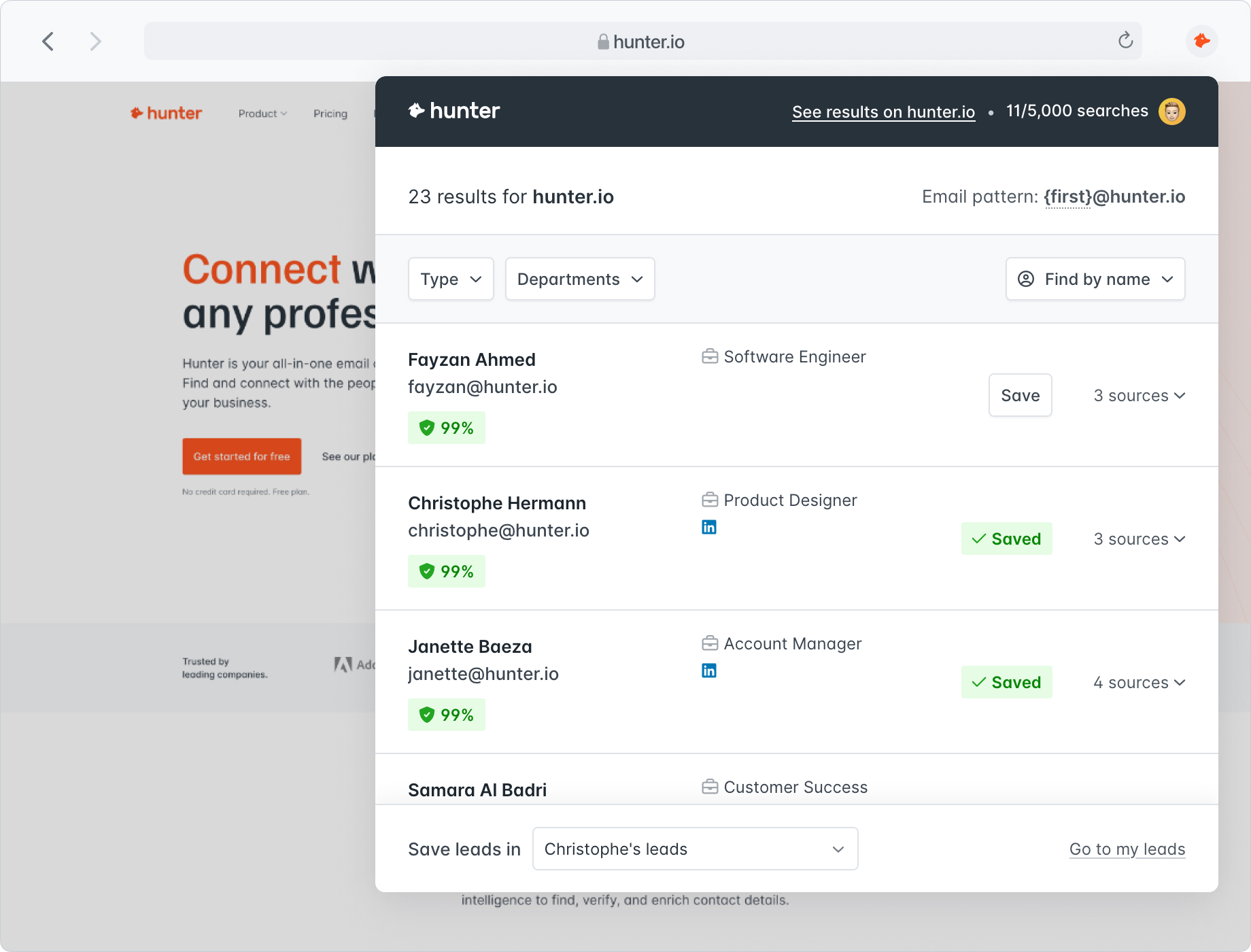
Hunter.io search results.
Hunter.io features
- Contact & Company Data Availability: Domain-based email discovery with limited but accurate contact context
- Data Accuracy & Quality: Strong verification system with confidence scoring for emails
- Lead Generation & Prospecting Tools: Domain search, bulk email finder, and basic lead list creation
- Integrations & Workflow Automation: Integrates with CRMs and tools like Google Sheets and outreach platforms
- Analytics, Performance, & Platform Reliability: Basic reporting with consistent system performance
How Hunter.io pricing works
Hunter.io offers 5 pricing plans:
- Free: Starting at $0 (50 credits)
- Starter: Starting at $49/month (2,000 credits)
- Growth: Starting at $149/month (10,000 credits)
- Scale: Starting at $299/month (25,000 credits)
- Custom: Available by quote
What markets does Hunter.io serve?
Hunter.io is perfect for individuals who want email search functionality at their fingertips without a complicated process. Hunter.io is great for people who do specific searches or individual prospecting, and not mass outreach campaigns.

Snov.io – Best for Cold Outreach Automation
Snov.io has incorporated email finder and outreach automation capabilities into its services, making it a great option for a sales team implementing cold email campaigns. Snov.io provides a good balance between email finder and outreach capabilities, allowing users to manage their email marketing campaigns on a single platform.
Snov.io will be great for a sales team that wants to automate outreach campaigns immediately after identifying prospects. The platform can run drip campaigns, track emails, and even verify email addresses, all at an affordable price.
- Built-in cold email automation tools
- Affordable compared to enterprise platforms
- Good balance of prospecting and outreach features
- Smaller database compared to larger competitors
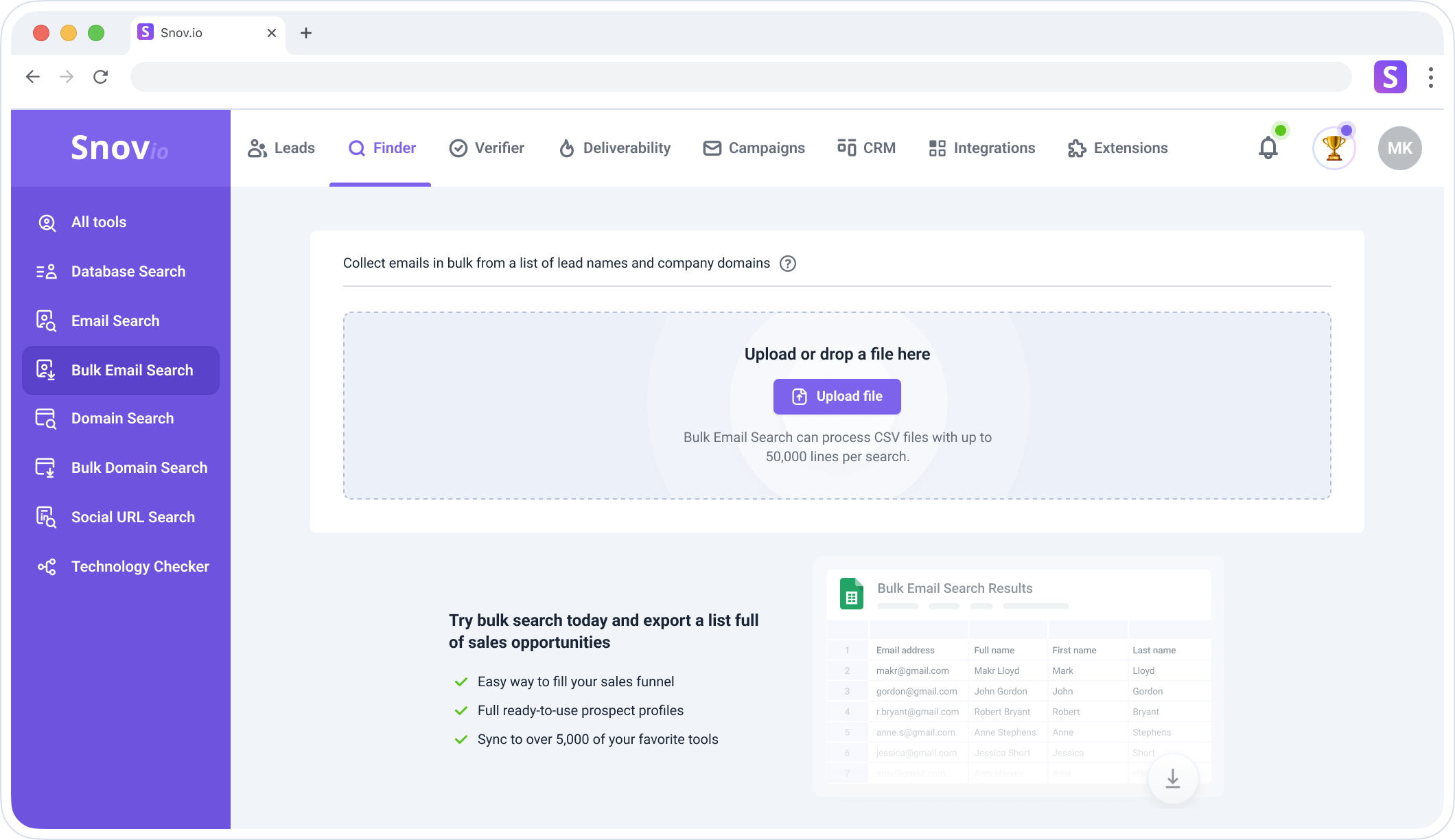
Snov.io bulk email search.
Snov.io features
- Contact & Company Data Availability: Moderate-sized database with enrichment and email discovery tools
- Data Accuracy & Quality: Includes verification tools and bounce reduction features
- Lead Generation & Prospecting Tools: Email finder, domain search, and lead list building
- Integrations & Workflow Automation: CRM integrations plus automated drip email campaigns
- Analytics, Performance, & Platform Reliability: Campaign tracking, open/click monitoring, and basic reporting
How Snov.io pricing works
Snov.io offers 3 pricing plans to choose from, along with a trial plan that renews every 30 days:
- Starter: Starting at $39/month (1,000 credits)
- Pro:
- Small: Starting at $99/month (5,000 credits)
- Medium: Starting at $189/month (20,000 credits)
- Large: Starting at $369/month (50,000 credits)
- Ultra: Starting at $738/month (100,000 credits)
- Custom Ultra: Available by quote (From 200,000 credits)
What markets does Snov.io serve?
Snov.io can be the most effective tool for start-ups, small sales teams, freelancers, and digital marketing professionals looking for a cost-effective way to integrate email prospecting and outreach automation.

Skrapp.io – Best for LinkedIn Prospecting
Skrapp.io is a software tool designed to find email addresses on LinkedIn. Using this solution, one can obtain verified email addresses directly from LinkedIn profiles or company websites. Such a feature is in high demand among recruiters and sales representatives.
The browser extension that comes with Skrapp.io provides great convenience for collecting leads while browsing LinkedIn. This solution enables users to save time when creating prospect lists by staying within the same platform.
- Strong LinkedIn integration via Chrome extension
- Simple and fast prospecting workflow
- Affordable pricing for small teams
- Limited functionality outside LinkedIn
- Smaller standalone database
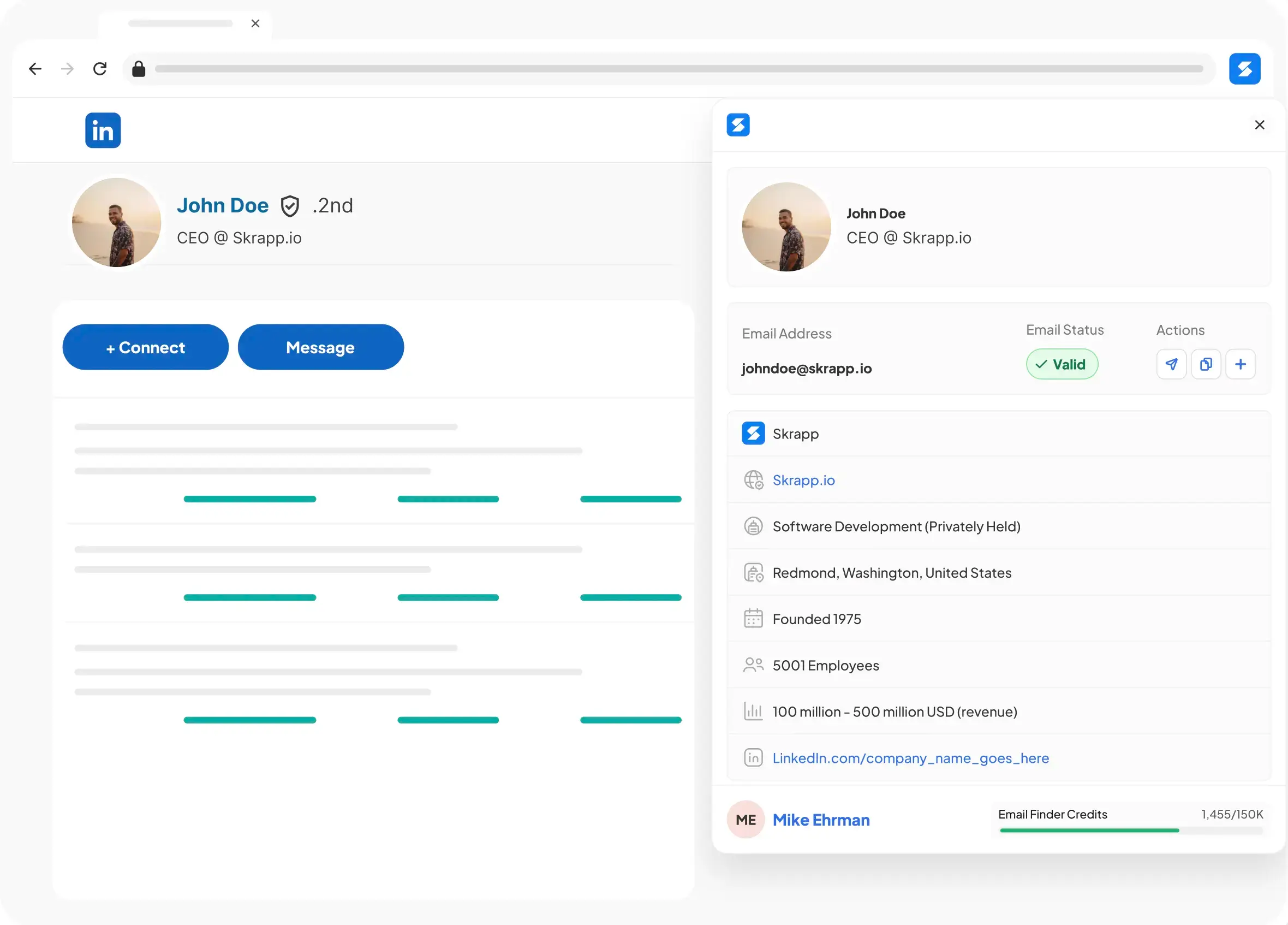
Skrapp.io LinkedIn profile email finder.
Skrapp.io features
- Contact & Company Data Availability: Primarily LinkedIn-sourced contact data
- Data Accuracy & Quality: Good accuracy with built-in email verification tools
- Lead Generation & Prospecting Tools: LinkedIn URL scraping, list building, and email extraction
- Integrations & Workflow Automation: CRM exports and basic integration options
- Analytics, Performance, & Platform Reliability: Lightweight reporting and stable extension performance
How Skrapp.io pricing works
Skrapp.io offers 3 pricing plans:
- Free: Starting at $0 (50 credits)
- Professional: Starting at $39/month (2,000 credits)
- Enterprise: Starting at $349/month (50,000 credits)
What markets does Skrapp.io serve?
Skrapp.io suits recruitment professionals, advanced LinkedIn users, and B2B salespeople who use social media and networking to generate leads. The software performs excellently when users extract leads directly from LinkedIn rather than through database search queries.
Anymail Finder – Best for Email Verification Accuracy
Anymail Finder is an email finder tool that specializes in verification and charges customers only for verified, deliverable emails. Rather than focusing on building vast databases, this tool aims to deliver accurate, deliverable emails. Anymail Finder appears to be the right choice for companies interested in their campaign performance.
The pay-per-verified-email approach means customers spend credits only on real contacts, which improves email marketing results.
- Only charges for verified emails
- High deliverability focus
- Simple and transparent pricing model
- Smaller database compared to competitors
- Limited prospecting and enrichment features
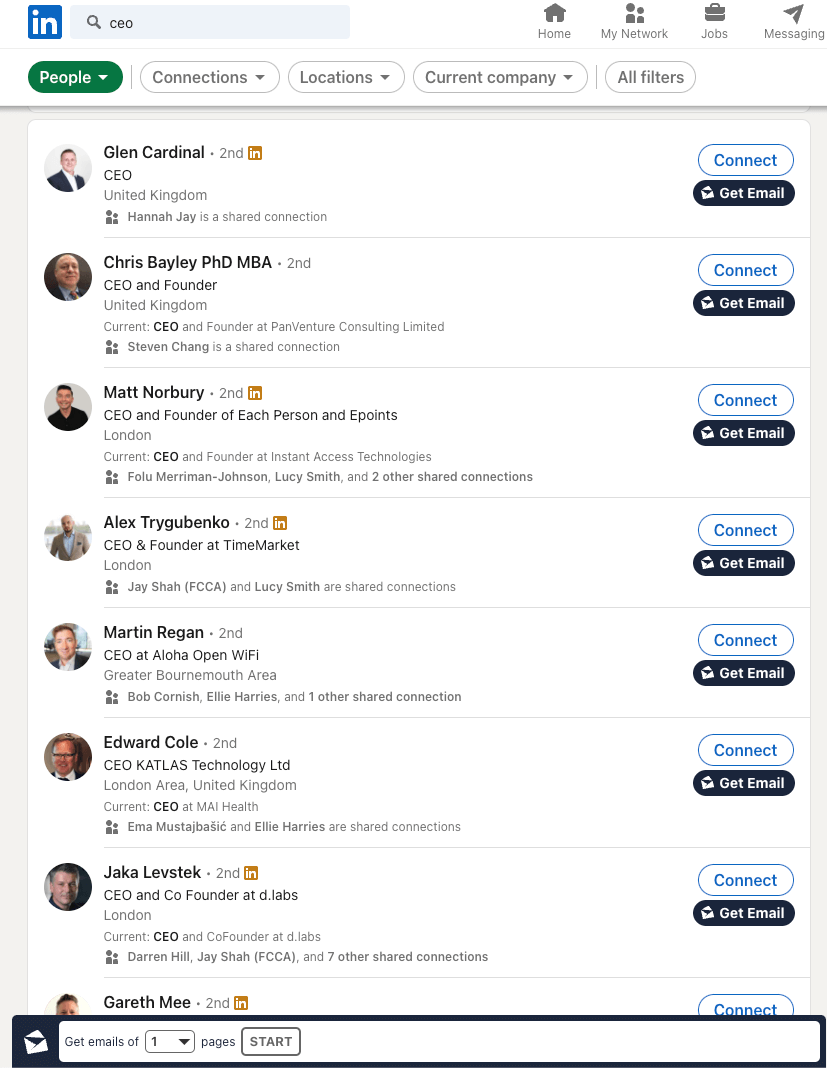
Anymail Finder LinkedIn integration.
Anymail Finder features
- Contact & Company Data Availability: Focused on email-level discovery rather than deep company data
- Data Accuracy & Quality: High accuracy due to a strict verification process
- Lead Generation & Prospecting Tools: Basic search and domain lookup tools
- Integrations & Workflow Automation: API access and CRM export options, like CSVs
- Analytics, Performance, & Platform Reliability: Minimal analytics but strong system reliability
How Anymail Finder pricing works
Anymail Finder offers 8 pay-as-you-go plans based on the amount of credits you want to buy, along with a 3-day free trial:
- 400 credits: Starting at $29/month
- 1,000 credits: Starting at $49/month
- 2,000 credits: Starting at $89/month
- 5,000 credits: Starting at $149/month
- 10,000 credits: Starting at $199/month
- 25,000 credits: Starting at $299/month
- 50,000 credits: Starting at $499/month
- 100,000 credits: Starting at $799/month
What markets does Anymail Finder serve?
Anymail Finder would be an excellent choice for marketers looking to focus on deliverability and efficiency of their email campaigns rather than bulk prospecting. This tool is perfectly suited to any marketing activity where accuracy is valued more than quantity.

GetProspect – Best for Small Teams & Startups
GetProspect is a straightforward and inexpensive email finder tool for small teams, startups, and individuals who need the basics of prospecting without the steep learning curve.
The software offers LinkedIn email extraction and the option to use simple filters when creating your lead list.
- Budget-friendly pricing
- Easy-to-use interface
- Good for beginners and small teams
- Limited advanced features
- Smaller database compared to enterprise tools
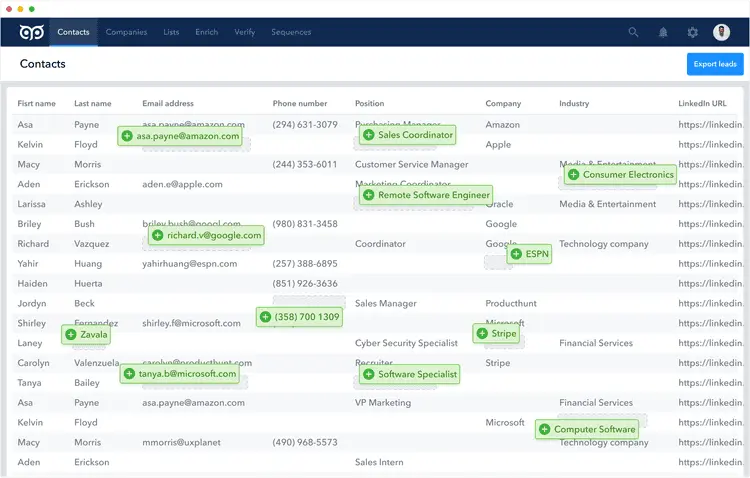
GetProspect contact page.
GetProspect features
- Contact & Company Data Availability: Moderate B2B database with LinkedIn integration
- Data Accuracy & Quality: Decent accuracy with built-in verification tools
- Lead Generation & Prospecting Tools: Email finder, list building, and filtering
- Integrations & Workflow Automation: CRM exports and basic integrations
- Analytics, Performance, & Platform Reliability: Simple reporting and stable performance
How GetProspect pricing works
GetProspect offers 5 pricing plans to choose from:
- Free: Starting at $0 (50 valid emails)
- Starter: Starting at $49/month (1,000 valid emails)
- Growth 5k: Starting at $99/month (5,000 valid emails)
- Growth 20k: Starting at $199/month (20,000 valid emails)
- Growth 50k: Starting at $399/month (50,000 valid emails)
What markets does GetProspect serve?
GetProspect suits young companies, small organizations, independent professionals, and new sales teams that need an easy, affordable way to create a prospect list without costly sales tools.

UpLead – Best for High Data Accuracy
UpLead is popular for its ability to verify emails in real time and maintain high data accuracy. As a result, it ranks among the best lead generation tools in the B2B space. UpLead allows users to access a large business contact database while verifying emails during the download process.
The emphasis on data accuracy makes UpLead particularly useful for businesses that emphasize deliverability and clean data. It’s used by sales and marketing teams that cannot tolerate high bounce rates or low-quality leads.
- Real-time email verification
- High-quality B2B data
- Strong filtering and segmentation tools
- No built-in email outreach automation
- Higher cost compared to lightweight tools
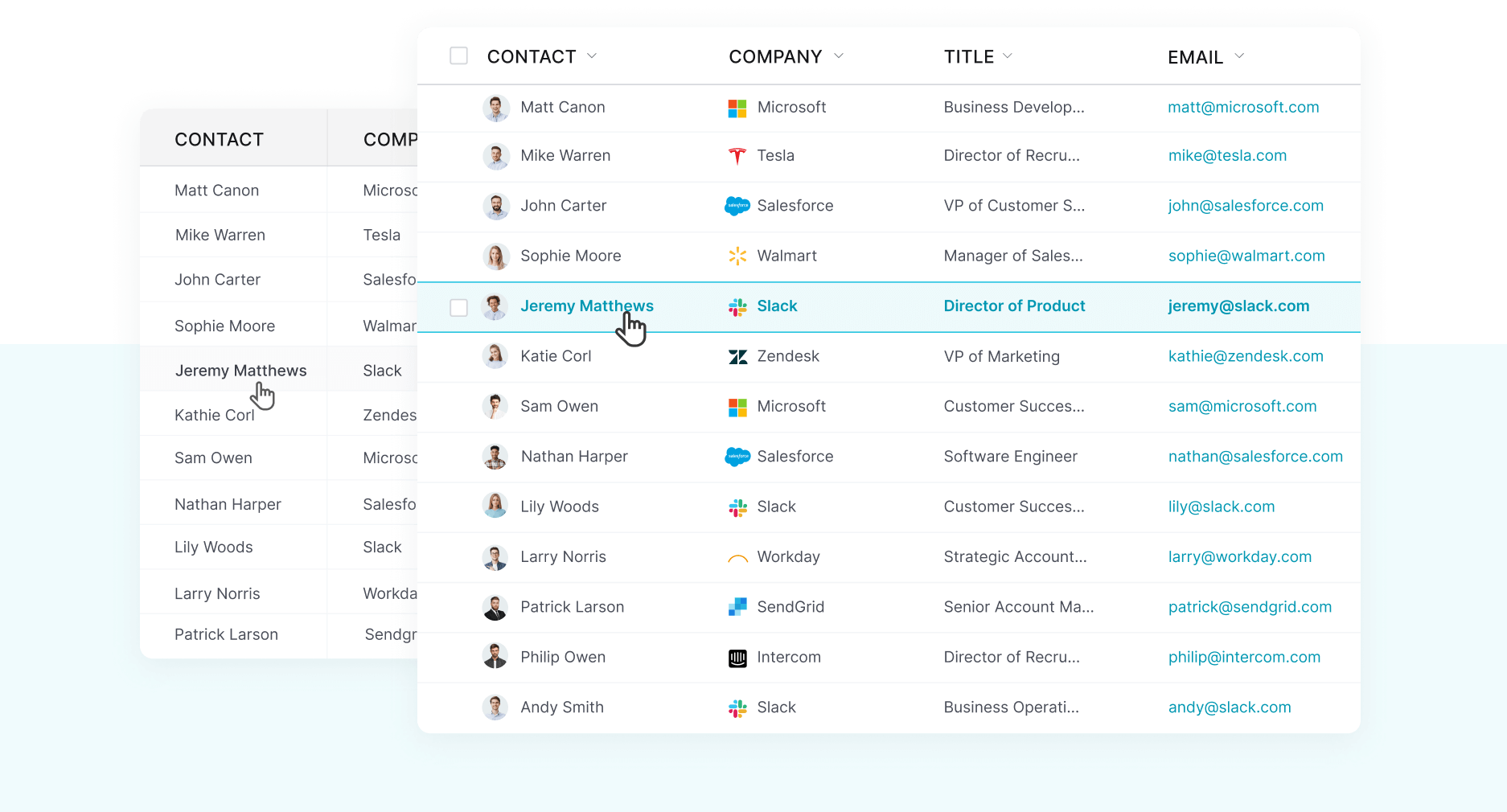
UpLead contacts.
UpLead features
- Contact & Company Data Availability: Large B2B email database with detailed firmographic filters
- Data Accuracy & Quality: Real-time verification ensures high deliverability
- Lead Generation & Prospecting Tools: Advanced search, filtering, and list building
- Integrations & Workflow Automation: CRM integrations and API access
- Analytics, Performance, & Platform Reliability: Stable platform with basic reporting tools
How UpLead pricing works
UpLead offers 4 pricing plans, along with a 7-day free trial:
- Free Trial: Starting at $0 (5 credits)
- Essentials: Starting at $99/month (170 credits)
- Plus: Starting at $199/month (400 credits)
- Professional: Available by quote
What markets does UpLead serve?
UpLead is best suited for B2B sales, marketing firms, and lead-generation teams at enterprises that require accurate contact details. The platform would work well for businesses that prioritize lead quality over quantity.
Compare the Best Email Finder Tools Side-By-Side
| Software name | Why we picked it | Starting price for cheapest plan | Highlights |
|---|---|---|---|
| Apollo.io | Best All-in-One Sales Platform | $0 | Database and outreach tools |
| Hunter.io | Best for Simple Email Lookup | $0 | Domain search |
| Snov.io | Best for Cold Outreach Automation | $39/month | Email sequences |
| Skrapp.io | Best for LinkedIn Prospecting | $0 | LinkedIn scraping |
| Anymail Finder | Best for Email Verification Accuracy | $29/month | Verified emails only |
| GetProspect | Best for Small Teams & Startups | $0 | Simple UI |
| UpLead | Best for High Data Accuracy | $0 | Real-time verification |
What Are Email Finder Tools?
Email finder applications are software tools designed to help businesses and individuals find professional email addresses and contacts from reliable sources. Email finders extract information from various public sources, proprietary databases, and verification services to provide businesses with accurate business email addresses associated with specific individuals or enterprises. They must also comply with GDPR regulations, which require them to handle personal emails and data responsibly, ensure proper sourcing and transparency, and support the lawful use of contact information for outreach within the European Union.
Contemporary email finders offer much more than just a lookup function. The providers usually include a large B2B database, various filters, enrichment functions, and an email verification service, ensuring that found emails are valid and deliverable. They can often go beyond emails by also providing verified phone numbers. Many such tools also offer additional information about the company, including the job position of a particular person, their industry sector, company size, and technology stack used by the company. Additionally, many email finder tools can be integrated into CRMs and outreach platforms, making them indispensable for salespeople, recruiters, marketing specialists, and advertising agencies.
How Do Email Finder Tools Work?
These tools scan large databases containing business and professional contact information to generate potential email addresses for an individual or company. The information is collected through publicly available sources, collaborations, web scraping, and user submissions. They are sorted by criteria such as name, company name, domain, and job title, allowing users to search.
Upon initiating a search, the software returns probable email addresses based on common company email patterns, such as firstname.lastname@company.com, as well as actual email addresses stored in the database. More sophisticated tools validate the addresses before sending them to the user. Some tools also enrich the information they gather by providing additional details on the individual, such as their job position and the nature of the company.
What Are the Top Email Finder Tools for Improving Lead Generation?
Some of the top email finder tools include Apollo.io, UpLead, Hunter.io, Snov.io, Skrapp.io, Anymail Finder, and GetProspect. Each of these tools is designed to provide specific functionality and benefits, including verified leads identification, list building, automated sales outreach, data accuracy, database enrichment, email deliverability assurance, and more. Apollo.io and UpLead are considered the best for salespeople due to their extensive B2B databases and capabilities for company data enrichment. Hunter.io and Skrapp.io may be helpful if users require rapid lookup or LinkedIn prospecting functionality. Snov.io allows users to automate sales outreach processes based on identified contacts. Anymail Finder is an email verifier that lets users pay for their emails only after delivery verification is complete. Finally, GetProspect is well-suited for startups seeking a lightweight, affordable solution.
Each of the email finder tools mentioned can be applied to specific business needs. Users should consider which functionality best suits their sales activities. For instance, Apollo.io is often chosen for sales intelligence, while UpLead is known for its accuracy. Hunter.io and GetProspect are usually the first options for quick and efficient prospecting.
How Much Do Email Finder Tools Cost?
The pricing models used in most email finder tools include the subscription-based model coupled with credit. This means that each credit opens access to one verified email or contact. The cost varies depending on data quality, the features, and other components. Most email finder tools will offer entry-level packages for $30–$50 per month. This pricing makes such services affordable for freelancers, startups, and small sales teams. The package is normally accompanied by a certain number of credits, which are valid for a limited period. Entry-level tools include platforms such as Hunter.io, Snov.io, Skrapp.io, and Apollo.io.
The mid-level plans are typically priced between $70 to $150 per month. This pricing level is designed to serve expanding sales teams seeking more sophisticated tools. The plan features more credits, advanced filters, and CRM integration. UpLead and Apollo.io are two examples of companies whose pricing falls into this category once they exceed their basic service levels. Enterprise-level solutions vary in price depending on the features. Most are priced between $200 and $1,000 per month.
Email Finder Tools FAQs
What is the 30/30/50 rule for cold emails?
The 30/30/50 rule for cold emails is a basic formula that can help you achieve better results by leveraging targeting, content, and your mailing list. According to the rule, 30 percent of your success depends on targeting the right prospects by identifying B2B leads, another 30 percent on writing relevant messages for your recipients, and the remaining 50 percent on the accuracy of your mailing list. To put it simply, no matter how well you craft your message, it will be ineffective if you send it to the wrong people.
Is there a free email finder?
Yes, there are free email finder tools available; however, they lack extensive functionality. Most tools use a basic pricing model in which users get a set number of credits each month for searching or verifying emails. Hunter.io, Snov.io, Skrapp.io, and GetProspect all offer free accounts, yet their free plans limit the number of contacts one can generate or export. Free versions can work well for one-off purposes, testing a tool, or finding a few contacts when one starts prospecting.
What are the top-rated email finder tools for businesses?
Businesses can use many top-ranking email finder software programs to identify new leads for their organizations. Some of the best email finder software applications on the market today include Apollo.io, UpLead, Hunter.io, Snov.io, Skrapp.io, Anymail Finder, and GetProspect. The choice of email finder software depends on various factors. For instance, the choice of Apollo.io and UpLead is typically made by sales teams because of their extensive databases and robust prospecting capabilities. Hunter.io is widely used for email lookups by domain. On the other hand, Snov.io and Skrapp.io offer automated workflows along with LinkedIn prospecting capabilities. Anymail Finder is preferred for its stringent verification process.
How We Chose the Best Email Finder Tools
The top email finders were selected through a thorough analysis of 25 email finders using a standardized, uniform methodology. We reviewed each tool against five equally weighted criteria.
- Variety of Features: We evaluated each email finding tool based on how well it supports the core needs of lead generation and outbound sales, including the availability of contact and company data, email search capabilities, verification accuracy, and prospecting tools. Platforms that offered advanced filtering, data enrichment, and the ability to handle large-scale list building while maintaining speed and accuracy ranked highest. We also prioritized tools with strong CRM integrations, automation features, and support for LinkedIn or domain-based prospecting.
- Pricing and Fees: We compared monthly subscription costs, credit-based pricing models, and free-tier limitations to understand the true cost of using each platform. Email finder tools that offered transparent pricing, flexible plans, and strong value at lower tiers scored better. We also considered how pricing scaled with usage, especially for teams that require high-volume email discovery and verification without excessive per-contact costs or restrictive credit systems.
- Onboarding and Support: We assessed how easy each tool is to set up and use in real-world sales and marketing workflows. This included onboarding experience, available training materials, and the responsiveness of customer support through email, chat, or help centers. Tools that offered intuitive interfaces, quick setup, and accessible learning resources ranked higher, particularly for small teams or first-time users who need to get started quickly without technical barriers.
- Reputation and Reliability: We reviewed real-world user feedback, industry reputation, and long-term platform performance. Email finder tools with strong reviews, consistent data accuracy, and reliable uptime were prioritized. We also considered how well each platform maintains data freshness and deliverability, since outdated or inaccurate contact data can directly impact campaign performance and reduce the effectiveness of outbound sales efforts.
By doing this, we ensure that the email finders we recommend deliver consistent results regardless of how they are deployed—whether by a single person or an entire team of salespeople.