Fleet Management Software Reviews
Starting with 86 fleet management software options and narrowing the list to 15 vendors, we evaluated each based on customer support, feature depth, and business-friendly pricing to determine the best options. However, there’s no all-in-one solution. That’s why we’ve organized our picks into specific categories. Below, you’ll find our for the best fleet management software across different use cases and industries. To see how we did it, check out our section on methodology.
If you’re ready to upgrade your fleet operations, explore our top fleet management software picks for 2026 below.
Whip Around – Best for Mobile Workflows
Whip Around is a fleet management provider that focuses on streamlining communication and operations, particularly through its mobile app. It offers competitive pricing and a strong feature set across both iOS and Android devices. For example, mechanics can upload inspection data and photos in real time, which can then be accessed by authorized users at any time.
- Free version for one user/vehicle
- Excellent user reviews
- Mobile app on iOS and Android
- No GPS tracking
- No fuel management
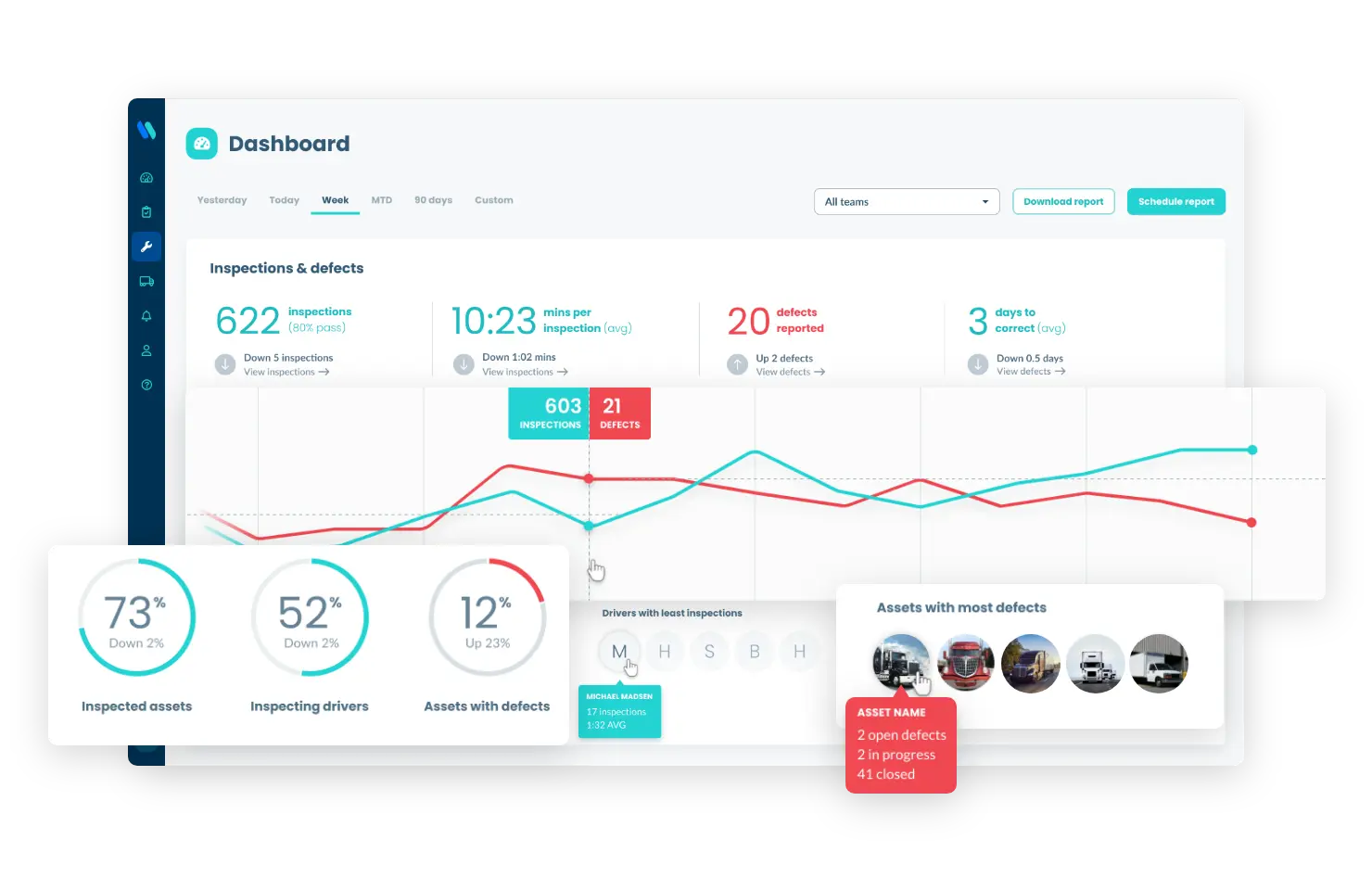
Whip Around Dashboard. Source: WhipAround.com
Whip Around features
- Fuel Management – Whip Around doesn’t currently include built-in fuel management tools.
- GPS Tracking – Whip Around doesn’t currently offer native GPS tracking features.
- Mileage Tracking – Drivers can use their mobile devices to capture odometer readings. The mileage data is then automatically uploaded to the Whip Around platform. Based on this data, the system sends notifications when a vehicle is due for maintenance.
- Mobile App – Whip Around’s mobile app is one of its key strengths, with strong reviews on both iOS and Android. The mobile interface includes deep functionality and enables efficient communication between drivers, managers, and mechanics.
- Live Tracking – Whip Around doesn’t currently offer any live GPS tracking features.
How Whip Around pricing works
Whip Around offers a free plan for single users or vehicles, with paid plans starting at a low monthly cost per asset. Pricing scales based on the number of vehicles and features selected, with higher tiers unlocking advanced inspection, maintenance, and compliance tools.
What markets does Whip Around serve?
With per-vehicle pricing, Whip Around could be a good option for fleets of nearly any size. A enterprise plan is available for fleet with more than 150 assets.
Read our full Whip Around review.
Verizon Connect – Best for Large Fleets
Verizon Connect provides enterprise-grade fleet management tools designed to help businesses optimize fleet operations at scale. It delivers detailed insights into vehicle tracking, driver behavior, fuel usage, and operational efficiency. It also includes customizable reporting and integrations with enterprise systems, making it ideal for organizations looking to scale and streamline fleet operations.
- Advanced real-time fleet tracking
- Customizable reports and real-time maintenance alerts
- Easy integration with existing systems
- More complex setup for smaller businesses
- Pricing is only available by quote
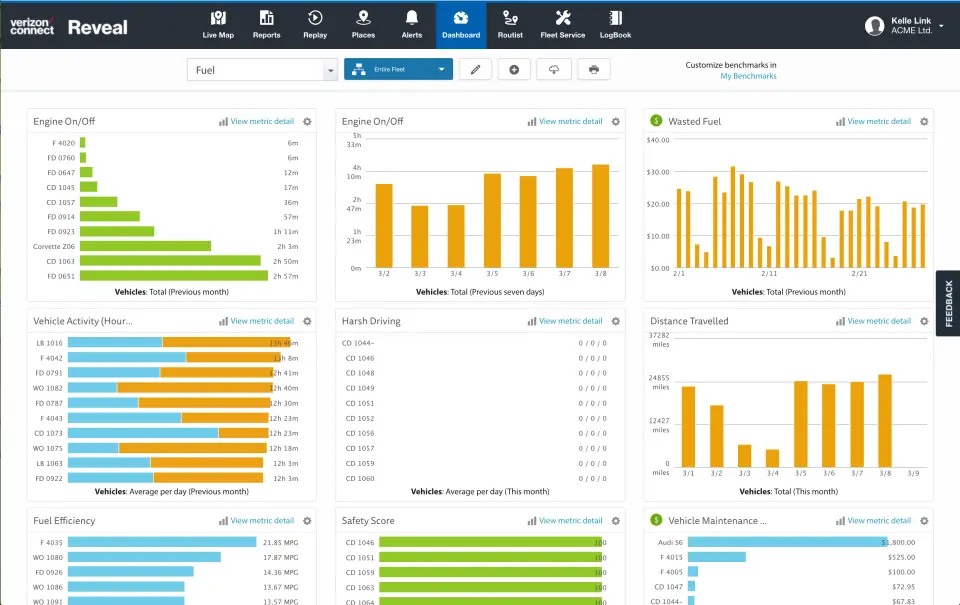
Verizon Connect Dashboard. Source: Software Advice
Get a Demo Visit Verizon Connect’s website.
Verizon Connect features
- Fuel Management – Tracks fuel consumption, idle time, and inefficiencies, helping identify cost-saving opportunities across large fleets.
- GPS Tracking – Provides high-frequency real-time location updates with advanced route visualization and geofencing capabilities.
- Mileage Tracking – Uses integrated telematics devices and GPS data to automatically calculate mileage across all vehicles in real time. This reduces manual entry and improves maintenance scheduling accuracy.
- Mobile App – Offers a driver and fleet manager mobile application that allows users to view routes, receive alerts, and monitor fleet status on the go. The app also supports basic communication between dispatch and drivers.
- Live Tracking – Provides continuous vehicle location updates with route replay, ETA prediction, and job site monitoring. This feature is one of Verizon Connect’s strongest capabilities.
How Verizon Connect pricing works
Verizon Connect uses custom pricing based on fleet size, hardware needs, and selected features. Businesses must request a quote, and total costs typically include software subscriptions, GPS hardware, and optional add-ons for advanced analytics and compliance tools.
What markets does Verizon Connect serve?
Verizon Connect is suited for businesses of all sizes, though it is primarily designed for mid-market and enterprise fleets. While setup is more complex than lightweight tools, its advanced feature set makes it ideal for large fleets that require in-depth operational insights and efficiency optimization.
Read our full Verizon Connect review.
Azuga – Best for Those New to Fleet Management Software
Azuga is an end-to-end fleet management platform known for its ease of use; you can install the hardware yourself and start using it right out of the box. In addition to core fleet management features, Azuga stands out for its unlimited customer and driver score gamification, which encourages safer driver and improved fleet efficiency.
- Gamifies and motivates drivers
- Unlimited customer support
- Two-way HD dashcam
- Long contract required
- Refresh rate can be slow compared to others
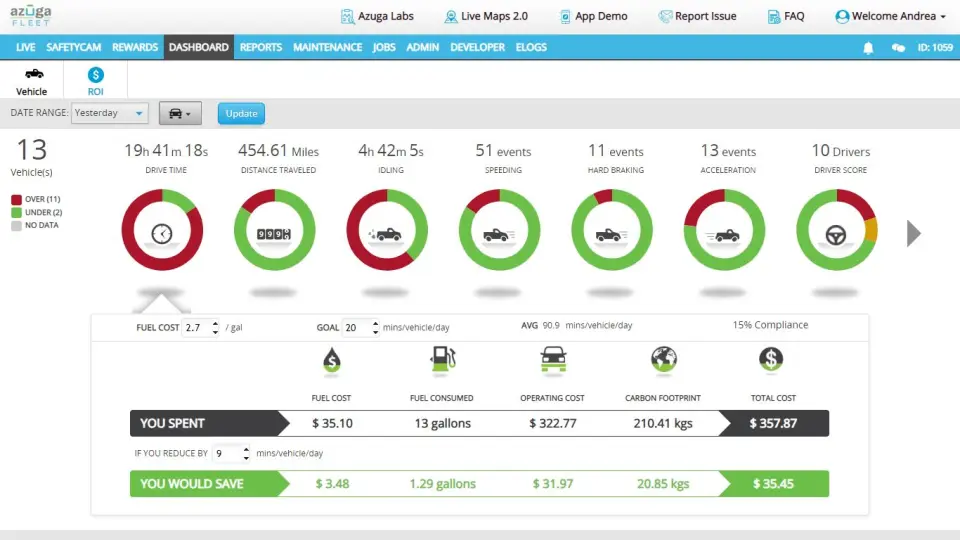
Azuga Dashboard. Source: Capterra
Get Started Visit Azuga’s website.
Azuga features
- Fuel Management – Tracks fuel consumption, fuel levels, and efficiency patterns using telematics data. It also identifies idling behavior and driving habits that increase fuel waste.
- GPS Tracking – Provides real-time vehicle location tracking, speed monitoring, route history, and event-based alerts such as harsh driving or geofence entry/exit.
- Mileage Tracking – Automatically record odometer mileage using GPS and telematics data, helping automate maintenance scheduling and reporting.
- Mobile App – Offers separate interfaces for drivers and administrators, enabling communication, route tracking, and workflow coordination between teams.
- Live Tracking – Vehicle locations are updated at frequent intervals (typically every few minutes), with ETA tools TrackMe helping predict arrivals and monitor fleet movement in real time.
How Azuga pricing works
Azuga offers subscription-based pricing that typically starts on a per-vehicle, per-month basis and is often bundled with required GPS hardware. Pricing varies by contract length, features such as dashcams, and fleet size, with discounts available for larger fleets.
What markets does Azuga serve?
Azuga is designed for easy setup and quick onboarding. In many cases, hardware can be self-installed without professional assistance. Customer service is available through multiple channels for troubleshooting and onboarding assistance. Azuga includes unlimited customer support, making it especially suitable for businesses new to fleet management software.
Read our full Azuga review.

Fleetio – Best Construction Fleet Management Software
Fleetio is not limited to construction vehicle fleets. Launched in 2012, Fleetio is used by both small fleets and large enterprise operations with thousands of vehicles. However, its strong focus on vehicle maintenance makes it especially effective for construction and service fleets that manage complex vehicle management.
- Drivers love how easy the issue reporting is
- Maintenance tracking effective and robust
- Effective for multiple offices and needs
- May have some difficulties onboarding
- Some want more customization
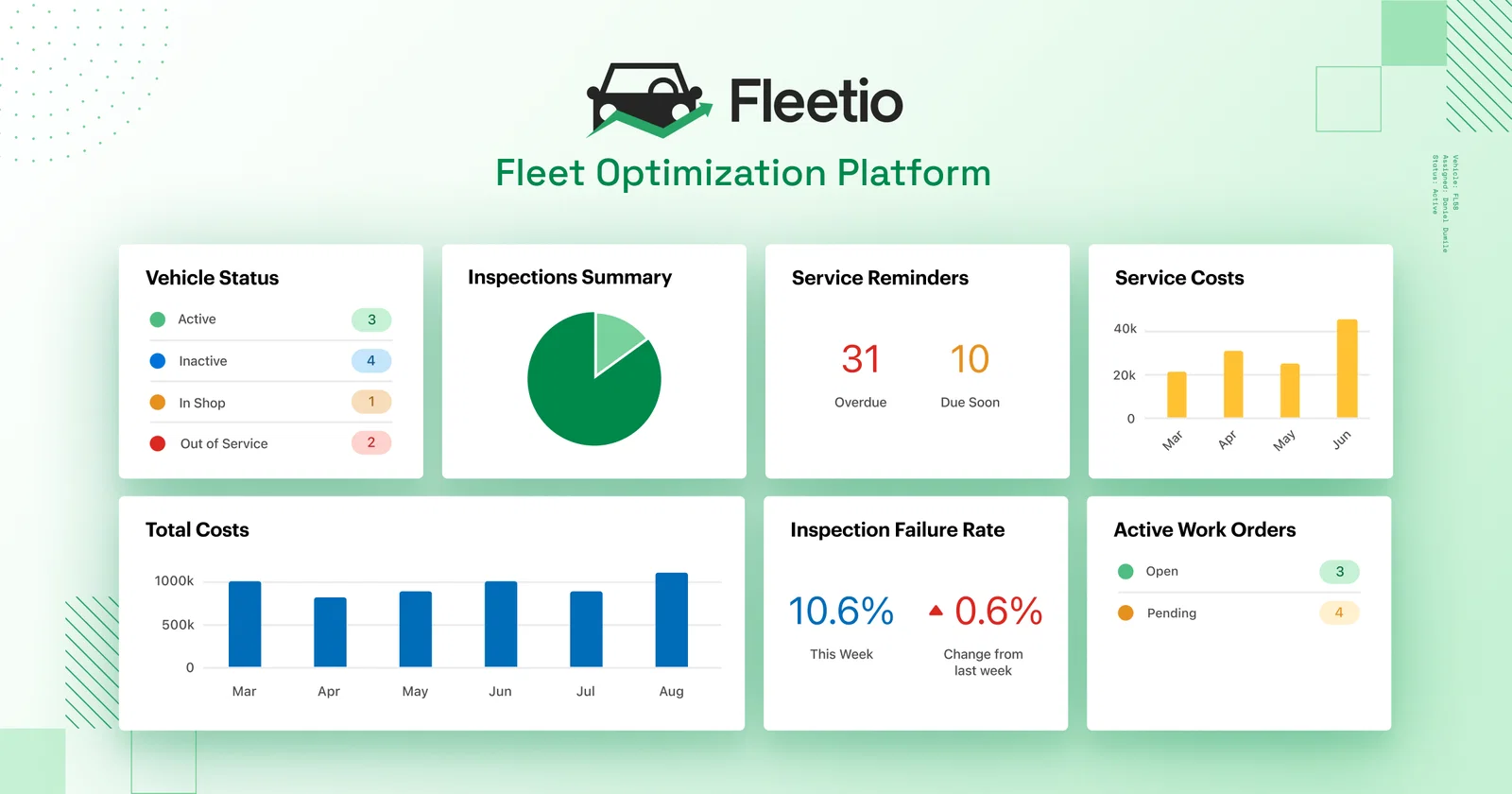
Fleetio Dashboard. Source: Fleetio.com
Fleetio features
- Fuel Management – Fuel cards help businesses track fuel purchases, fuel economy trends, and cost-per-vehicle data, helping teams identify inefficiencies and reduce fuel-related expenses across large fleets.
- GPS Tracking – Does not provide native GPS tracking. Instead, it integrates with third-party telematics providers to enable real-time location tracking when needed.
- Mileage Tracking – Automatically tracks mileage through integrations or manual entry, using this data to trigger maintenance schedules and maintenance reminders.
- Mobile App – The mobile app allows drivers and technicians to log inspections, submit issues, and update vehicle data, which syncs directly with the central dashboard.
- Live Tracking – Fleetio does not offer built-in live tracking. Fleet visibility depends on third-party GPS integrations rather than native real-time monitoring.
How Fleetio pricing works
Fleetio uses a per-vehicle, per-month pricing model with multiple tiers based on feature access. Lower-cost plans focus on maintenance tracking, while higher tiers include advanced automation, integrations, and reporting capabilities.
What markets does Fleetio serve?
Fleetio is not limited to construction fleets. It works for a wide range of fleet types across industries. However, its maintenance-first approach makes it especially valuable for large, complex fleets with multiple locations.
Read our full Fleetio review.
Compare Fleet Management Software Quotes and Save

Teletrac Navman – Best for Safety & Compliance
Teletrac Navman TN360 is an enterprise fleet management platform designed to keep vehicles, drivers, and operations connected in real time. By simplifying fleet operations, such as vehicle tracking, driver management, fuel efficiency, and maintenance, TN360 helps organizations scale more effectively.
- Heavy compliance features
- Detailed tracking and reporting
- Dashcam included
- Pricing is vague and complicated
- Might be too complex for SMBs
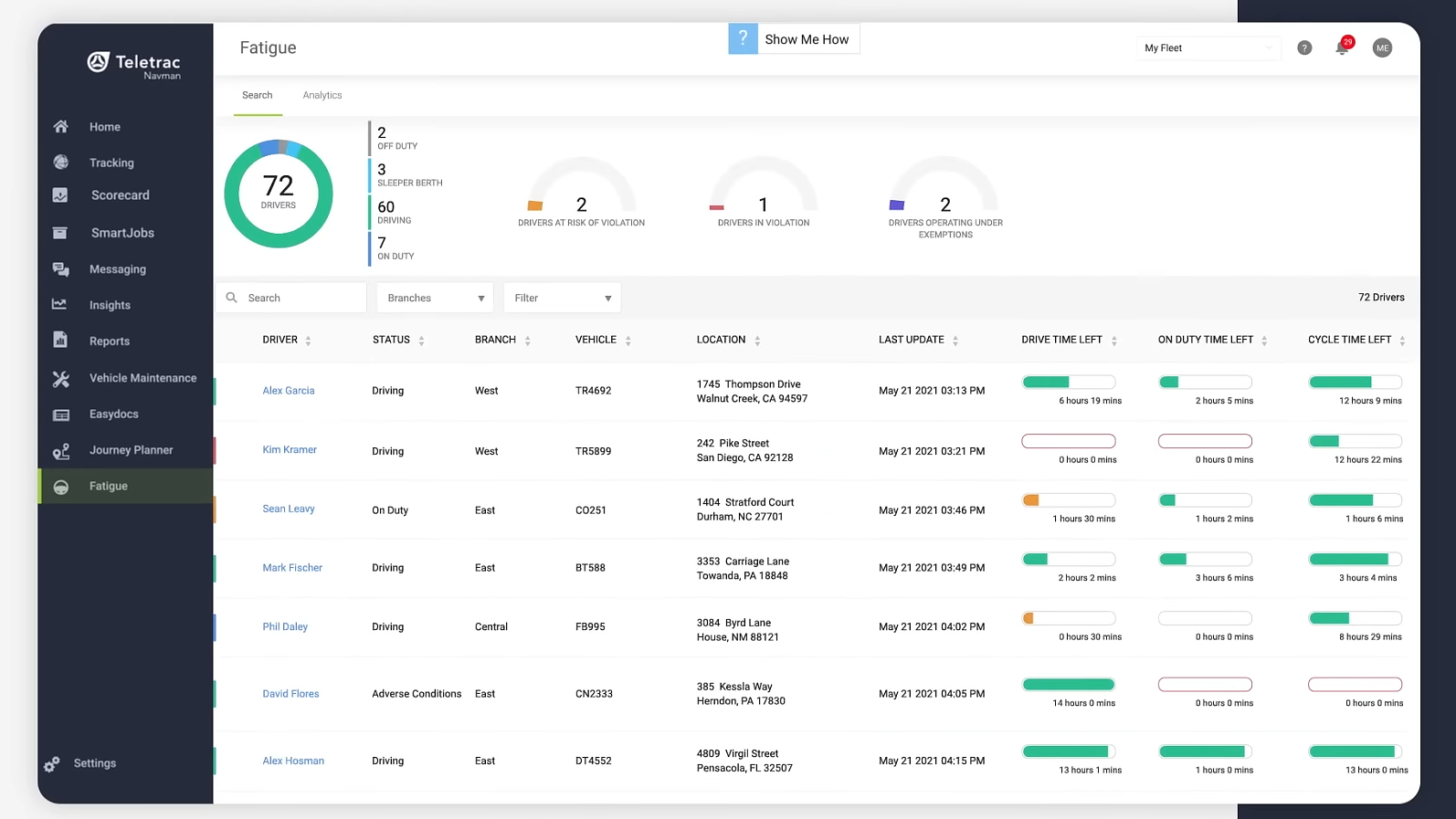
Teletrac Navman Fatigue Dashboard. Source: Expert Market
Compare Quotes Visit Expert Market’s website.
Teletrac Navman features
- Fuel Management – Monitors fuel usage indirectly through driving behavior such as idling, speeding, acceleration, and braking patterns to identify inefficiencies and reduce fuel waste.
- GPS Tracking – Provides real-time fleet visibility with geofencing, job site monitoring, and detailed route history to improve operational efficiency.
- Mileage Tracking – Automatically records mileage via GPS telematics, enabling accurate tracking of distance traveled for maintenance scheduling and reporting.
- Mobile App – Offers mobile tools for drivers and fleet managers to view routes, receive alerts, and stay connected between field operations and office teams.
- Live Tracking – Provides continuous vehicle location updates and real-time operational insights through its telematics devices and a vehicle health and vehicle diagnostics platform.
How Teletrac Navman pricing works
Teletrac Navman offers custom pricing tailored to each fleet’s size and operational needs. Costs typically include software subscriptions, GPS hardware, and optional compliance and safety add-ons, with pricing available only through a direct quote.
What markets does Teletrac Navman serve?
Teletrac Navman is available for fleets of all sizes, but it’s best suited for large and enterprise-level operations. Its feature set, especially compliance and reporting tools, is most valuable for organizations management large vehicle fleets.
Read our full Teletrac Navman review.
RTA – Best Small Fleet Maintenance Software
RTA was founded by Ron Turley, a former UPS driver. He later became a fleet manager and worked on improving fleet operations and efficiency at scale.
Today, RTA aims to reflect that operational expertise through its fleet maintenance software. Because the company was built by fleet professionals, its software is designed with real-world operational needs in mind.
- Affordable per-user/per-month pricing
- Keeps tabs on vehicle warranties and similar details
- Robust and helpful customer support
- User interface can be complex to learn
- Could use more live tracking features
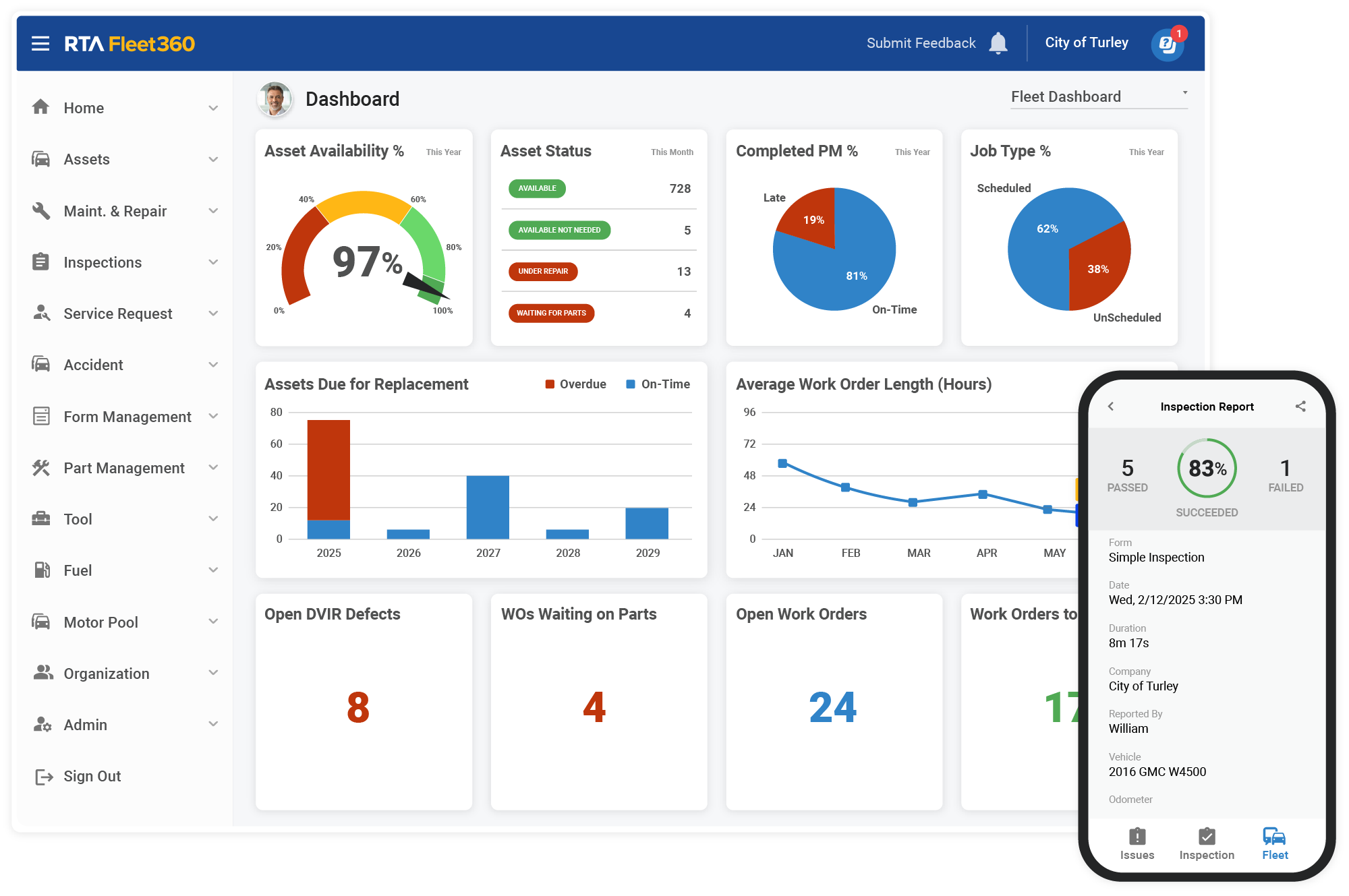
RTA Dashboard. Source: RTAFleet.com
Compare Quotes Visit Expert Market’s website.
RTA features
- Fuel Management – RTA tracks fuel usage and fuel-related expenses alongside maintenance records to help fleets monitor operational costs.
- GPS Tracking – RTA does not offer native real-time GPS tracking but can integrate with external systems to provide fleet location visibility.
- Mileage Tracking – Tracks vehicle mileage to help schedule preventative maintenance and monitor vehicle usage trends.
- Mobile App – Allows users to log maintenance activity, review vehicle records, and manage fleet data, though onboarding may require support assistance for full setup.
- Live Tracking – RTA does not provide built-in live tracking; location tracking depends on third-party integrations.
How RTA pricing works
RTA offers subscription-based pricing that is typically structured on a per-user, per-month basis. Costs vary depending on fleet size, required features, and deployment needs, with scalable options for growing businesses.
What markets does RTA serve?
RTA supports a wide range of industries and fleet sizes, offering flexible maintenance management tools.
Read our full RTA review.
AUTOsist – Best Trucking Fleet Management Software
AUTOsist positions itself as a simple, straightforward way to manage trucking fleets and general vehicle fleets. Launched in 2014, the company emphasizes simplicity as its core design principle.
- Ease of use—both for businesses and drivers
- Can customize inspections for vehicles
- Expense tracking is transparent and easy to read
- Great comments on customer support
- Some difficulties with mobile onboarding
- Inventory tracking lacking
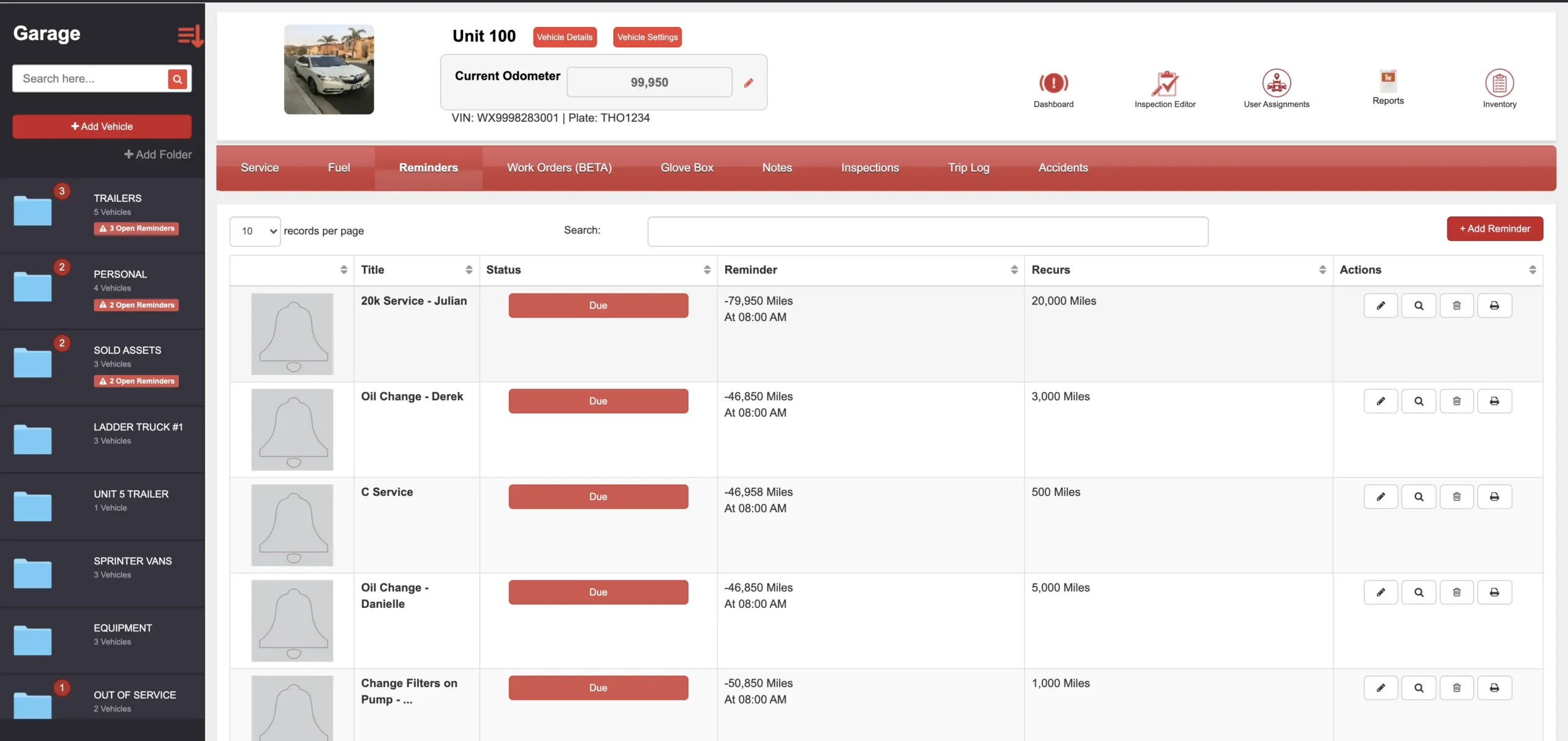
AUTOsist Dashboard. Source: PCMag
Compare Quotes Visit Expert Market’s website.
AUTOsist features
- Fuel Management – AUTOsist tracks fuel expenses and usage records, helping fleets log costs and maintain visibility over fuel consumption trends.
- GPS Tracking – AUTOsist provides basic GPS tracking through integrations or third-party tools, offering a simplified view of fleet location rather than advanced telematics.
- Mileage Tracking AUTOsist logs vehicle mileage through manual entry or app-based reporting, helping fleets track usage and schedule maintenance.
- Mobile App – Offers a mobile app for drivers and managers to log inspections, track expenses, and update fleet records, though some users report occasional onboarding friction.
- Live Tracking – AUTOsist does not provide advanced real-time live tracking; location visibility depends on connected GPS tools or integrations.
How AUTOsist pricing works
AUTOsist offers a free tier for basic fleet management, with paid plans starting at a flat monthly rate for a set number of vehicles. Pricing increases based on fleet size and access to more advanced features like reporting and integrations.
What markets does AUTOsist serve?
Like other platforms on this list, AUTOsist isn’t limited to trucking fleets. It can be used by any organization managing a fleet of vehicles. However, its feature set and ease of onboarding make it especially appealing for trucking companies that are new to fleet management software.

Onfleet – Best Fleet Management Software Tools for Delivery
Onfleet is designed to improve last-mile delivery operations—helping businesses track deliveries and ensure orders reach customers efficiently and reliably. Founded in 2015, the platform offers management tools designed for dispatching, route optimization, and on-time delivery execution.
- Effective driver app to keep team connected
- Rerouting, adding/editing stops
- Easy onboarding and user interface
- Flatter pricing, better for bigger companies
- Maybe not ideal for more frequent deliveries
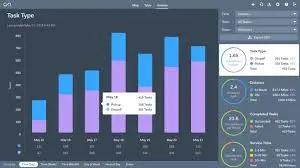
Onfleet Dashboard. Source: PCMag
Compare Quotes Visit Expert Market’s website.
Onfleet features
- Fuel Management – Onfleet does not directly track fuel usage but provides actionable insights (like route efficiency and stop optimization) that indirectly help reduce fuel costs.
- GPS Tracking – Provides real-time driver location with route visibility, enabling dispatchers to monitor and optimize routes dynamically.
- Mileage Tracking – Onfleet does not provide native mileage tracking; mileage must be inferred through route data or external integrations.
- Mobile App – Onfleet’s driver app enables navigation, delivery updates, proof-of-delivery capture, and messaging for real-time communication with dispatch teams.
- Live Tracking – Provides continuous real-time delivery tracking with live driver updates, route progress monitoring, and accurate ETA predictions for dispatchers.
How Onfleet pricing works
Onfleet uses a subscription model based on the number of tasks or deliveries completed per month, rather than the number of vehicles. Plans typically start at a higher monthly base cost and scale with usage, making it best suited for delivery-focused operations.
What markets does Onfleet serve?
Onfleet is built specifically for delivery and logistics rather than asset-heavy industries like construction or maintenance fleets. Its primary focus is live tracking and GPS coordination to help delivery companies optimize last-mile performance.
Rhino Fleet Tracking – Best for Optimizing Fleet Performance
Rhino Fleet Tracking, now part of GPS Insight, provides real-time fleet tracking and visibility through GPS-based mapping tools. It focuses on fuel efficiency and fleet optimization, helping businesses reduce operational costs and improve performance metrics. It was purchased by GPS Insight (founded in 2004), which expanded its fleet management offerings for dispatch and operations teams.
- Effective at fuel management and optimization
- Emphasis on GPS dashboards and live tracking
- Built-in reporting drives analytics and insights
- Will have to keep your own data records
- May have to pay extra for some features
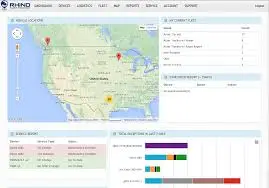
Rhino Fleet Dashboard. Source: Software Advice
Compare Quotes Visit Expert Market’s website.
Rhino Fleet features
- Fuel Management – Focuses on fuel efficiency insights through driving behavior analysis, idling detection, and route optimization to reduce fuel consumption.
- GPS Tracking – Provides real-time GPS fleet dashboards with location monitoring, route visualization, and performance tracking across vehicles.
- Mileage Tracking – Tracks mileage using GPS data to support maintenance scheduling and fleet usage reporting.
- Mobile App – Provides tools drivers and managers to access fleet data, view routes, and monitor vehicle status from mobile devices.
- Live Tracking – Offers real-time vehicle tracking through GPS dashboards, allowing dispatchers to monitor fleet movement and status continuously.
How Rhino Fleet Tracking pricing works
Rhino Fleet Tracking offers per-vehicle, per-month pricing that varies based on tracking frequency, hardware, and feature add-ons. Additional costs may apply for advanced reporting, integrations, and higher-frequency GPS updates.
What markets does Rhino Fleet Tracking serve?
GPS Insights, the parent company, focuses on fleet telematics solutions, and Rhino Fleet Tracking serves as a GPS-centric fleet management platform within that ecosystems. However, it remains a strong option for optimizing fleets that require continuous on road visibility and tracking.
Compare the Best Fleet Management Software Side-By-Side
| Software Name | Why we picked it | Starting price for cheapest plan | Highlights |
|---|---|---|---|
| Whip Around | Best for Mobile Workflows | $5/month/asset | Driver scorecards, asset tracking, vehicle inspection, and reporting tools |
| Verizon Connect | Best for Advanced Fleet Management Solutions | Available by quote | Advanced vehicle tracking, driver analytics, fuel monitoring, and enterprise tools |
| Azuga | Best for Those New to Fleet Management Software | $25/month/vehicle (bundle pricing may apply) | Easy setup, driver gamification, safety scoring, and real-time fleet visibility tools |
| Fleetio | Best Construction Fleet Management Software | $5/month/vehicle | Maintenance tracking, inspections, service scheduling, and fleet record management |
| Teletrac Navman | Best for Safety & Compliance | Available by quote | Compliance management, ELD tracking, driver safety analytics, and enterprise-grade reporting |
| RTA | Best Small Fleet Maintenance Software | $3.60/month/user | Maintenance scheduling, service records, and fleet lifecycle tracking |
| AUTOsist | Best Trucking Fleet Management Software | Free tier available, then $59/month (5 vehicles) | Inspection tracking, expense logging, and simplified fleet management tools |
| Onfleet | Best Fleet Management Software Tools for Delivery | $500/month (pricing varies by usage) | Real-time delivery tracking, route optimization, dispatch tools, and driver communication |
| Rhino Fleet Tracking | Best for Optimizing Fleet Performance | $16/month/vehicle (feature add-ons may apply) | GPS tracking, fuel optimization insights, reporting dashboard, and fleet performance monitoring |
What is Fleet Management Software?
Think of fleet management software as an air traffic controller that oversees your fleet, vehicle needs, fuel efficiency, and overall operations.
Who Uses Fleet Management Software?
Construction fleets, trucking fleet, marine fleets, and delivery operations it all fall under the broader category of fleet management software. There are even fleet management systems designed for drones.
Companies of all sizes can use fleet management software as long as they operate vehicles. It’s especially useful for delivery and logistics companies, though construction service-based businesses also rely on it heavily. Fleet management software isn’t limited to private businesses. It can also be used by government agencies or academic institutions that manage vehicles fleets.
What Does Fleet Management Software Do?
Trucking, construction, marine, and delivery companies all need to monitor and manage their vehicles. However, the challenge is not just tracking vehicles in real time. It also includes monitoring efficiency, fuel usage, and maintenance needs. Any organization operating a fleet of vehicles should consider fleet management software.
Fleet management software is widely used and studied in both academic and professional settings. In general, it helps monitor and manage entire fleets, regardless of vehicle type, to improve operational efficiency.
Benefits of Using Fleet Management Software
Improving how you manage your fleet can deliver significant benefits, including better fuel efficiency, faster response to operational challenges, and overall improved business performance. But what does this look in practice? Some fleet management systems includes features like route editing for last-mile delivery optimization—capabilities that were not possible before modern mobile and GPS technology.
Businesses that don’t use fleet management software are often left at a disadvantage. Without it, businesses often rely on outdated systems, making it harder to respond quickly run reports, or track maintenance and fuel usage effectively.
How Much Does Fleet Management Software Cost?
Cost typically depends on the number of vehicles in your fleet. For example, Fleetio, which we list as a leading fleet management software, typically charges around $5 per vehicle per month. This pricing model allows businesses to scale costs gradually as they add vehicles, making it accessibility for small and growing fleets.
Other platforms, like Onfleet, use flat rate pricing models that typically start in the hundreds of dollars per month, depending on usage and fleet size pricing model depends on whether your business prefers per-vehicle pricing or flat-rate subscription structures.
Fleet Management Software FAQs
What is the best fleet management software to choose?
Above, we outlined our top fleet management software picks across categories, including delivery, construction, and small business operations. We recommend reviewing the pros and cons of each platform to determine which features best match your operational needs and which limitations you can accept.
What does fleet management software do?
Fleet management software provides a centralized dashboard that allows you to monitor fleet performance both in real time and over time. It also provides a 360-degree view of key fleet operations, including maintenance needs, fuel efficiency, and driver behavior.
Why do I need fleet management software?
You need fleet management software if you operate and manage a fleet of vehicles. Using fleet management software make it easier for drivers to log mileage and communicate with dispatch, while helping managers improve performance, efficiency, and oversight.
How do I choose a fleet management system?
Review the comparison table and feature breakdowns above to find a system that best fits your industry and operational needs. Be sure to compare multiple options to ensure the platform you choose includes the features your business requires.
How We Chose the Best Fleet Management Software
From a curated list of dozens of fleet management platforms, we narrowed the selection down to just over a dozen finalists. From there, we evaluated each platform based on the following criteria:
- Variety of Features: We prioritized platforms that offer core fleet management capabilities such as GPS tracking, fuel monitoring, mileage tracking, maintenance scheduling, mobile apps for drivers and managers, and real-time live tracking. Platforms with more comprehensive, user-friendly feature sets scored higher.
- Pricing Transparency: We evaluated how clearly vendors present pricing information, including per-vehicle or per-user costs, subscription tiers, and whether custom quotes are required. Platforms with upfront, easy-to-understand pricing structures ranked highest.
- Customer Support: We assessed the availability and accessibility of customer support, including live chat, email, phone support, onboarding assistance, and knowledge bases. Providers with multiple reliable support channels and strong onboarding resources scored best.
- Brand Reputation: We reviewed recent customer ratings, testimonials, and third-party reviews to gauge overall user satisfaction, reliability, and platform trustworthiness. Vendors with consistently strong feedback received higher rankings.
We then used a 1-5 scoring system to evaluate customer service, feature depth, and pricing transparency across all platforms. We also analyzed how these features aligned with different industries, which helped shape our final recommendations. The final step is your own evaluation—choosing and testing a fleet management software solution that fits your business needs.