
What is Float?
Float.com is a purpose-built resource management platform that helps professional services organizations plan and deliver work profitably. Rather than focusing on task-level execution, Float centers on people, giving leaders a real-time view of capacity, skills, utilization, tracking time with timesheets, and financial impact across projects.
Designed for multi-office, mid-sized professional services firms with 100–1,000 employees, Float enables Operations and Finance leaders to turn pipeline into realistic delivery plans while ensuring the right talent is assigned to the right work at the right time.
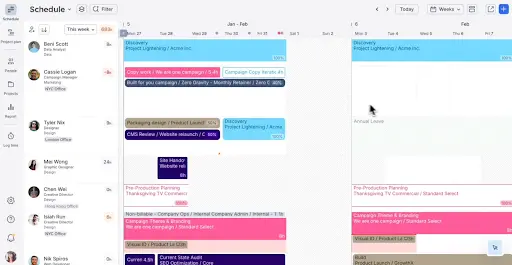
Float scheduling. Source: Float.com
Try for free Visit Float’s website
With intelligent forecasting, financial-aware resourcing, and flexible integrations, Float acts as a connective layer between CRM, finance, and delivery tools. It provides just enough signal to guide staffing decision-making, protect margins, and adjust early, without forcing teams into rigid workflows or enterprise-level complexity.
Is Float legit?
Founded in 2011, Float has emerged as a trusted resource planning tool for more than 4,500 professional service teams. It currently boasts big-name clients such as Ogilvy, Deloitte, KPMG, and M&C Saatchi.
Float has earned its reputation by staying focused on its mission to help teams treat talent as a strategic lever, not just a cost to manage. With the expansion of its AI capabilities via its Float Talent Graph™, it continues to emphasize its skills insights by relating skills to capacity, performance history, and financial data.
How much does Float cost?
Float offers tiered pricing based on team members and feature needs.
- Starting price:
- $7/scheduled user/month
- Free trial:
- 30 days
- Free version:
- None
| Float.com Pricing & Plans | |||
|---|---|---|---|
| Starter | Pro | Enterprise | |
| Starting at $7 per scheduled person/month | Starting at $12 per scheduled person/month | Contact Sales | |
| Essentials for basic resourcing | Advanced resourcing with actuals tracking | Expert partnership, from start to finish | |
Pricing above is based on annual payment and varies depending on the number of users and required features, with plans tailored for growing professional services organizations. Prospective customers can request a demo or quote to determine the best fit.
What’s included in every Float plan?
Float offers team capacity and availability, real-time dashboard insights, utilization views, and core resource scheduling, replacing manual spreadsheets across all plans. As the team grows, other tools are included for forecasting, alignment, and analytics.
More-advanced plans offer project cost estimations, planned vs. actual reporting, actual tracking (e.g., time tracking), and project currency (in progress). The Pro plan focuses on advanced forecasting and stronger comparison data, providing deeper insight and a forward-looking view of your profitability. Additionally, Float’s Enterprise plan offers a dedicated, named customer success manager.
Float provides users with detailed analysis for resource allocation decisions and quality collaboration tools for Operations, Finance, and Resource Management teams. It’s also built to integrate with existing CRM, ERP, and Finance solutions to streamline operations.
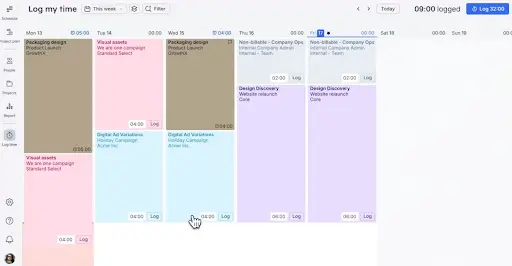
Float time tracking. Source: Float.com
Try for free Visit Float’s website
Which features does Float offer?
| Resource Management Software Features | |
|---|---|
| Collaboration Tools | |
| Resource Allocation | |
| Resource Forecasting | |
| Integrations | |
| Analytics | |
Other notable Float features
- Real-time capacity indicators
- Project scoping tools
- Project budgets and profitability monitoring
- Project estimates
- Live view, team’s schedule updates, and notifications
- Mobile app access
- Integrations with Slack & Google Calendar tools
- Time off & time tracking
What types of support does Float offer?
| Data Migration | |
| 1-on-1 Live Training | |
| Self-Guided Online Training | |
| Knowledge Base | |
| FAQs/Forum | |
| Email Support | |
| Live Chat | |
| Phone Support |
Try for free Visit Float’s website
Float user review highlights
We analyzed 3,612 user reviews about Float from three third-party review websites to provide this summary.
Customers have appreciated the ease of use of the Float website, which provides a simplified way to manage team capacity. Customers point out the timeline functionality, ease of viewing projects, templates for recurring projects, and drag-and-drop functionality as core features that ensure teams remain on the same page. Additionally, the ability to display information on worker availability, project completion, and allocation enables managers to make swift decisions, track projects, and set permissions. Customers have also appreciated the website’s simplicity and ease of use across various devices.
On the other hand, some users have pointed out that while Float is a decent tool for API resources and capacity planning for smaller and bigger teams and organizations, when it comes to sophisticated project management software and reporting, it can be a little restrictive. This is because some users feel that while reporting and custom capabilities may be lacking for sophisticated use cases, some features, such as note retention and availability across multiple projects on mobile platforms, may be a little less effective. Some users have complained about a couple of usability issues here and there.
- Ease of Setup – According to users, it is easy to get started with Float and doesn’t require much effort during setup. The ease with which one can get started with it, even for a newbie, is one reason why users appreciate it. Some users mention that there is a slight learning curve to master all its features.
- Ease of Use – It is appreciated for its intuitive, visual, and navigable interface. Schedule view, availability, and project timelines are easily viewed at a single-glance inspection, with drag-and-drop functionality for easy modification. Some users report minor bugs when using it on mobile devices or when dragging cards.
- Features – Float offers robust resource planning and project allocation. The features and benefits include timeline-based planning, filtering, or highlighting for specific projects. The cons include restrictions for advanced project planning and reporting.
- Quality of Support – The community values the help resources available to them. Though not all reviews specifically mention live customer support available directly to users, the community values the help.
- Value for Money – It is a common belief that most teams find Float to be of immense value, as it provides clear visibility into capacity resources. Its people-based planning functionality for managing margins continues to deliver effective improvements for professionals, even with minor shortcomings in mobile interfaces for more refined reporting.
Float Contact Information
- Headquarters:
- New York City, NY
- Year Founded:
- 2011
- Website:
- Float.com
- Twitter (X):
- x.com/float
- LinkedIn:
- linkedin.com/company/float-schedule
- YouTube:
- youtube.com/@Float-com
Float alternatives
| Software | Starting Price | B2B Reviews Score |
|---|---|---|
| Float | $7/scheduled user/month | 4.7 |
| Clicktime | $12/month/user | 4.9 |
| Connecteam | $29/month | 4.8 |